Configuring Column Settings
The Settings option allows authorized users to customize the columns to be displayed when a Dynamic report is printed and exported as PDF or CSV files. The report columns can be customized for an individual user generating the report or to all users at the property or customer levels.
Permissions
The following permissions must be assigned to enable the customization of report columns for users at the customer and property levels.
-
Stay_EnableTenantLevelReportConfiguration: Users with this permission assigned can customize the columns to be displayed in a report for all users associated with a tenant.
-
Stay_EnablePropertyLevelReportConfiguration: Users with this permission assigned can customize the columns to be displayed in a report for all users associated with a property.
These permissions are assigned to the System Administrator role by default.
Navigate to Reports ➜ Dynamic Reports.
Select the preferred report. The following screen is displayed.
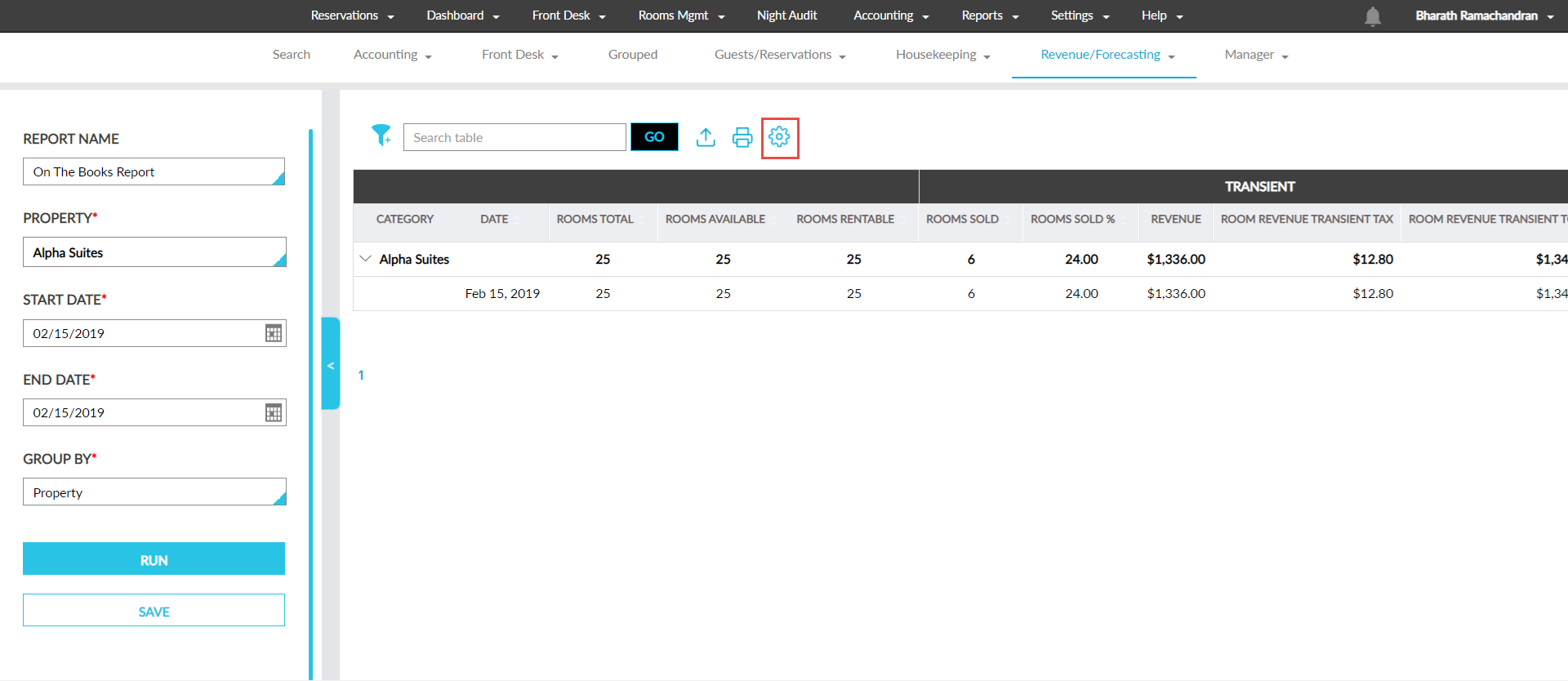
Click on the settings tool. The Column Settings screen is displayed.
Select from the following options displayed in the Configuration at field:
|
Option |
Description |
|---|---|
|
Apply to User |
This option is selected by default. When selected, the report columns can be customized for print and display in PDF and CSV files for the logged-in user only. |
|
Apply to All Users of Property |
This option is displayed only to users with the Stay_EnablePropertyLevelReportConfiguration permission assigned. Users can customize the report columns for all users associated with the property. Users who are also assigned the Stay_EnableTenantLevelReportConfiguration can modify the columns customized for the property-level users. An information icon added next to this option displays the following message: Property level configuration will be applied to all users associated within the respective property, unless overridden at the user level. When columns are customized for a user at the user-level, the customization done at the property-level will not be overridden and applied. |
|
Apply to All Users of Tenant |
Users with the Stay_EnableTenantLevelReportConfiguration permission assigned can customize the report columns for all users associated with the tenant. An information icon added next to this option displays the following message: Tenant level configuration will be applied to all users within the respective tenant, unless overridden at the user level. When columns are customized for a user at the user or property levels, the customization done at the tenant-level will not be overridden and applied. |
Customize the columns to be displayed when the report is exported as a CSV file in the Display (Includes CSV) column.
Customize the columns to be displayed when the report is printed and exported as a PDF file in the Print (Includes PDF) column.
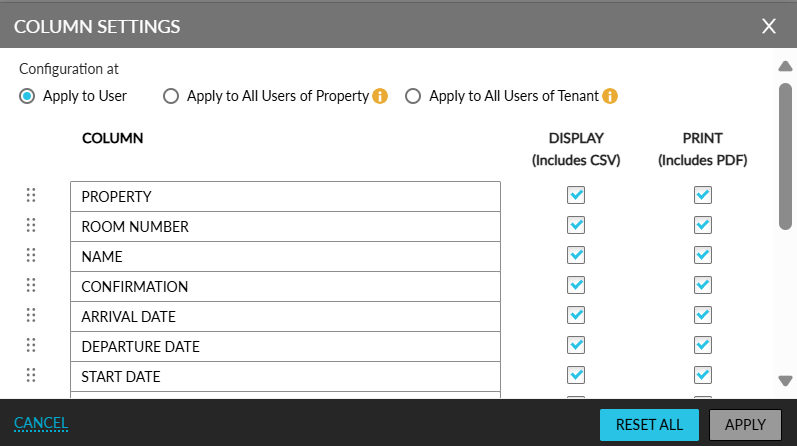
Click the Reset All option to reset the customized columns. When clicked, the Confirmation pop-up screen appears that displays the following options:
-
Print default columns: Resets the columns selected in the Print (Includes PDF) column.
-
Display default columns: Resets the columns selected in the Display (Includes CSV) column.
-
Column names and arrangements: Resets the column names configured and their order of display.
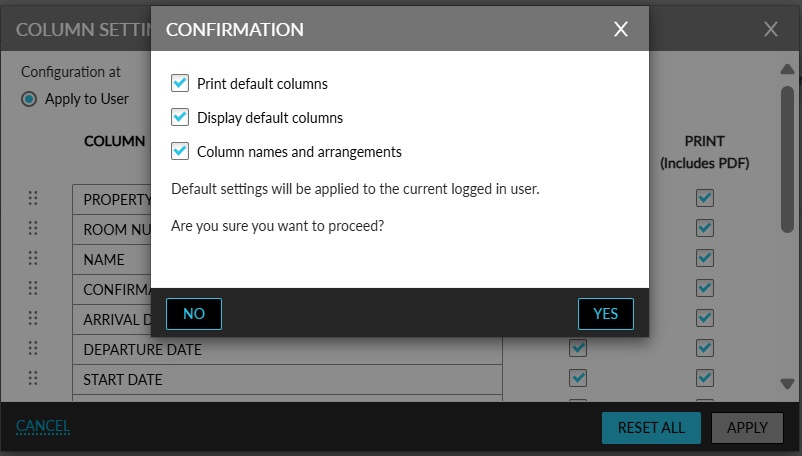
Select the preferred option to reset.
The selected option is validated against the option selected for the Configuration at field and the following messages are displayed:
|
Option Selected |
Message Displayed |
|---|---|
|
Apply to User |
Default settings will be applied to the current logged in user. |
|
Apply to All Users of Property |
Default settings will be applied to all users associated within the respective property, unless overridden at the user level. |
|
Apply to All Users of Tenant |
Default settings will be applied to all users associated within the respective tenant, unless overridden at the user level. |
When users click Yes, the columns customized will be reset as follows:
-
The columns customized at the user-level will be reset to the customization made at the property-level.
-
The columns customized at the property-level will be reset to the customization made at the tenant-level.
-
The columns customized at the tenant-level will be reset to default settings configured for the report.